
Last updated: November 2026
To use ChatGPT as an accountant, treat it as a first-draft assistant, not an adviser.
It saves the most time on repetitive tasks such as client emails, Excel formulas, document summaries, data clean-up and first drafts of reports.
Remove client-identifiable data first, write specific prompts, and have a qualified accountant check every output before it’s used.
Key takeaways
- ChatGPT is a large language model. It predicts text, so it can sound right and still get things wrong.
- The biggest time savings come from repetitive tasks: client communication, data entry, Excel work and first drafts.
- Never put sensitive client information into a public AI tool. Use a business plan and scrub data before you upload it.
- Every output needs a human cross check, and your firm should keep an audit trail of the prompts and responses it relies on.
- Using ChatGPT on its own won’t put your firm ahead. Building it into your accounting workflows will.
How to use ChatGPT as an accountant in 7 steps
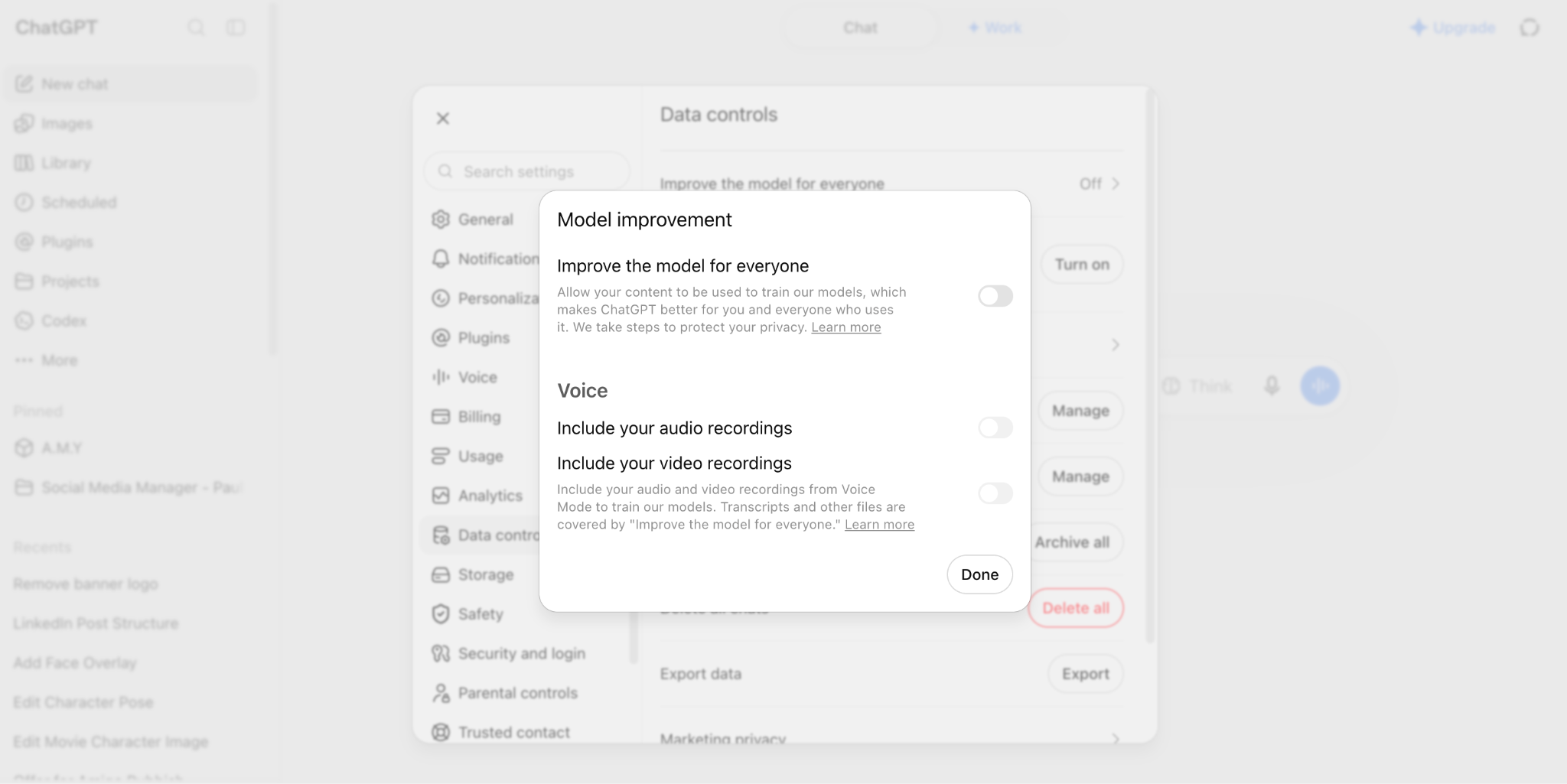
- Choose the right plan. Use ChatGPT Business or Enterprise for client work. On a personal plan, switch off “Improve the model for everyone” in Settings, then Data Controls.
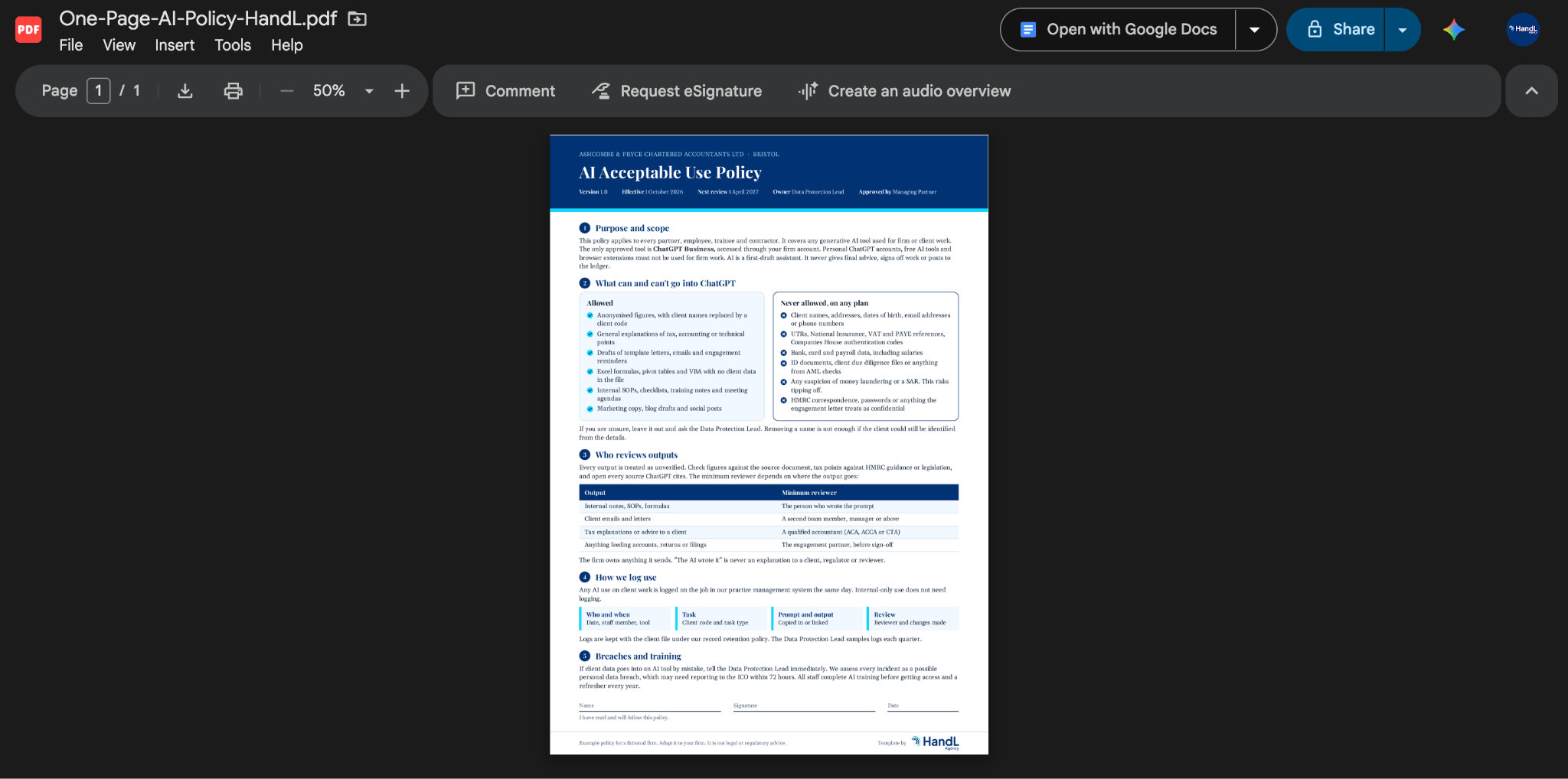
- Write a one-page AI policy. Cover what can and can’t go into ChatGPT, who reviews outputs and how you log use.
-
Pick three repetitive tasks. Choose jobs that happen daily, are heavy on text or data, and are quick to check.
-
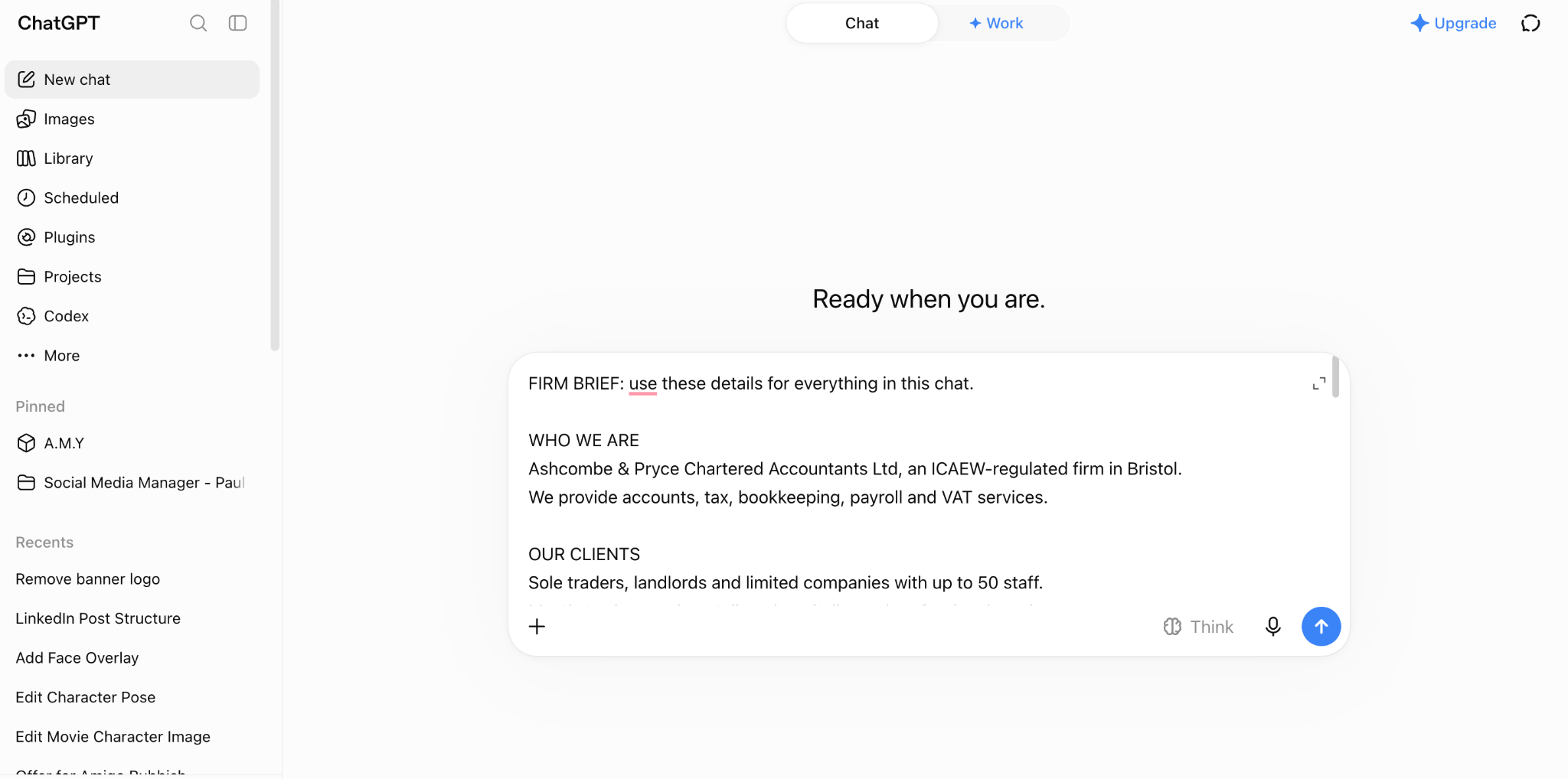
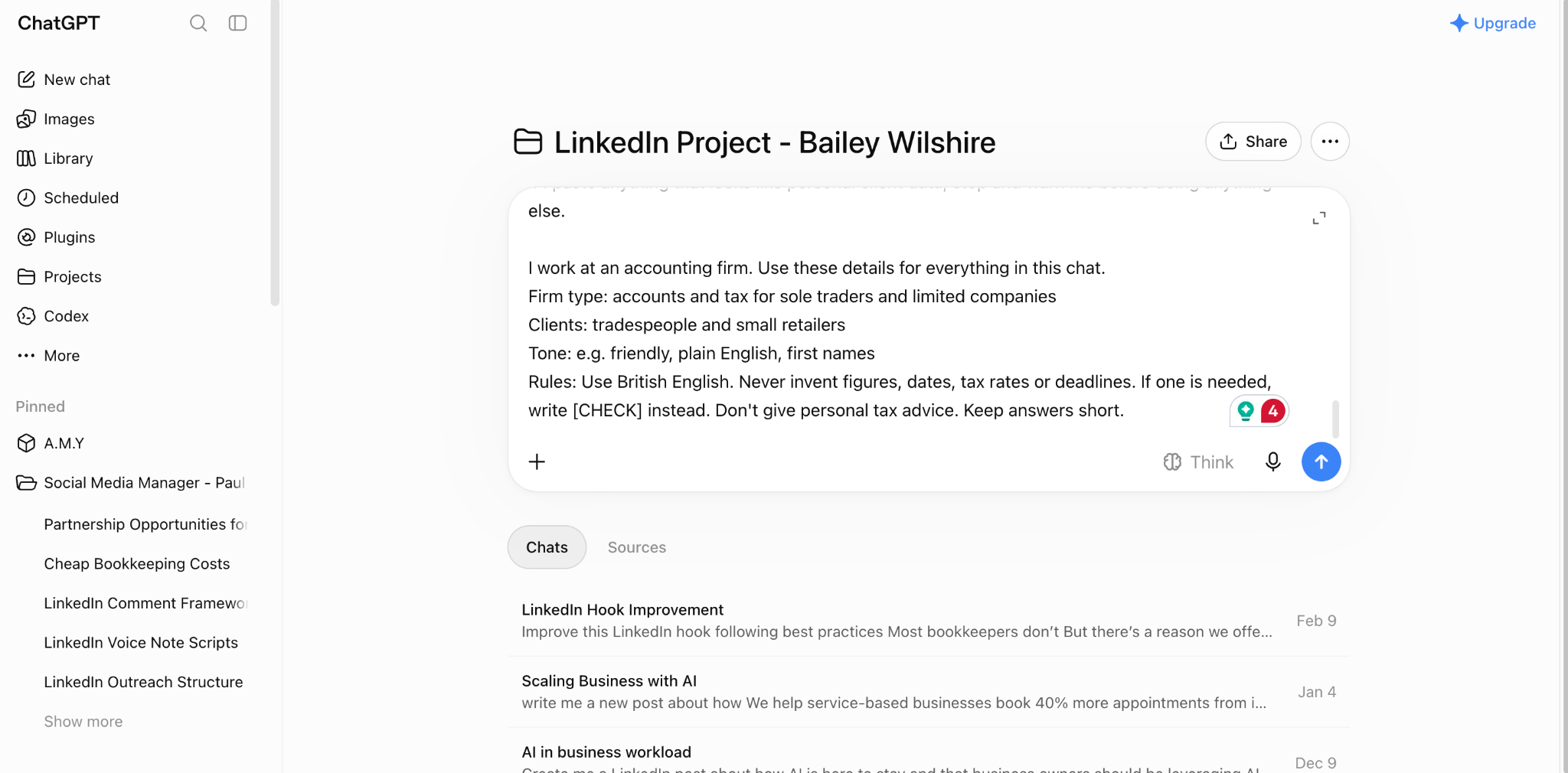
Save a firm brief. Paste it at the start of every chat so outputs follow your tone and rules.
- Write specific, scoped prompts. One task per prompt, a clear format, and no invented figures.
-
Cross check every output. Check figures against the source, tax points against HMRC guidance, and proofread before anything is sent.
-
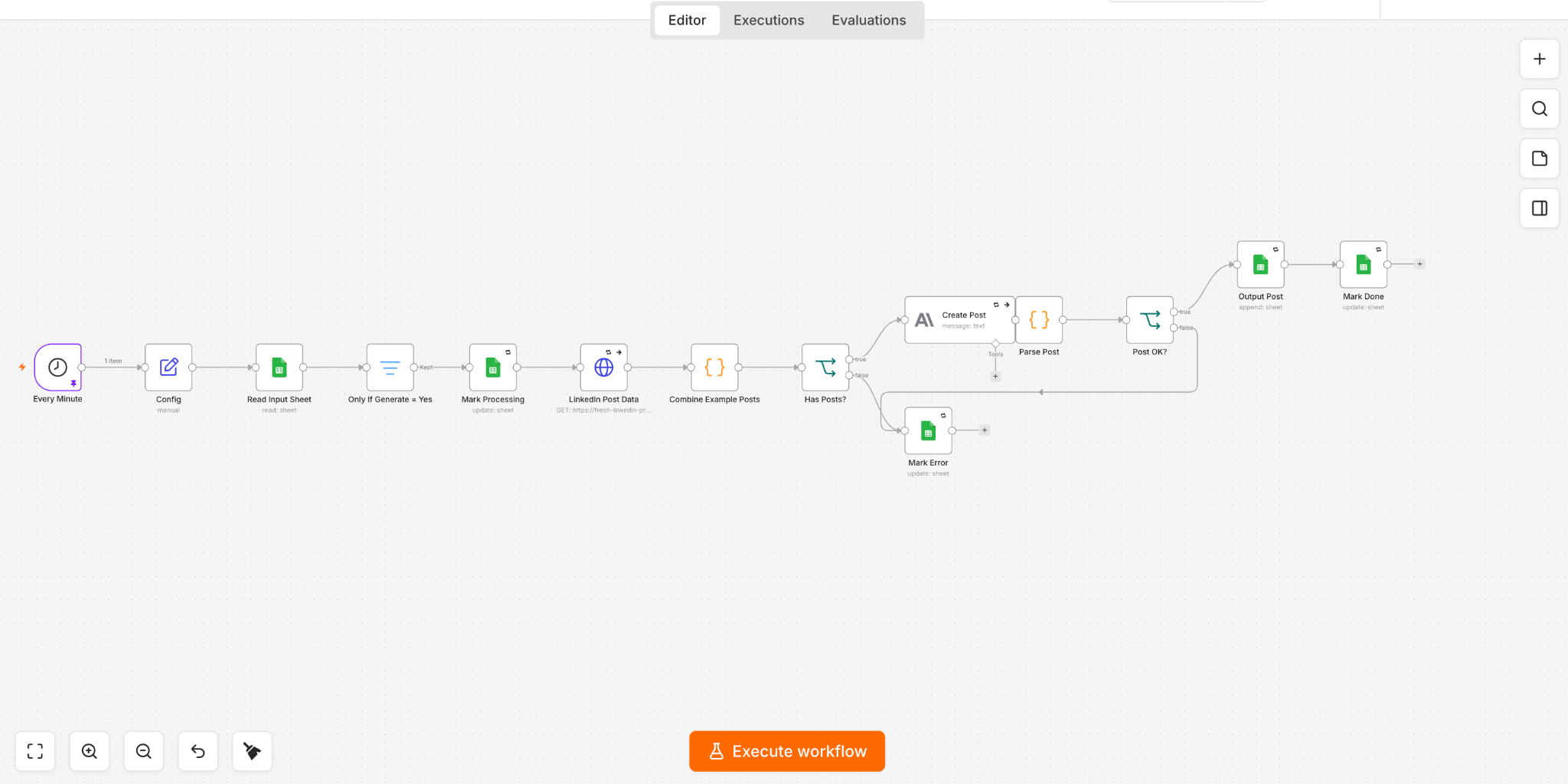
Log it, then scale it. Keep an audit trail, then move the tasks you repeat daily into custom GPTs or automations.
If you’re new to it, spend a weekend playing with the basics: emails, data entry, presentation decks, meeting notes. Get comfortable with the simple jobs first.
Luke Iles, HandL Agency
Artificial intelligence, generative AI and ChatGPT: what accountants need to know
ChatGPT is a generative AI tool built by OpenAI. It runs on a large language model, a type of artificial intelligence trained with machine learning on huge volumes of text. It doesn’t look facts up the way your accounting software pulls a balance. It predicts the most likely next words based on patterns in its training and the context you give it.
That one point explains most of its limitations. It’s why ChatGPT is excellent at writing, summarising and reorganising information, and why it can produce false information that reads as confidently as the truth. ICAEW’s regulatory team has reminded members that AI tools aren’t qualified accountants, and that their outputs deserve professional scepticism rather than blind trust.
ChatGPT has also moved into the tools accountants already use. ChatGPT for Excel and Google Sheets became generally available on all plans in May 2026, so much of this guide now applies inside the workbook as well as the chat window.
Why accounting firms can’t ignore ChatGPT
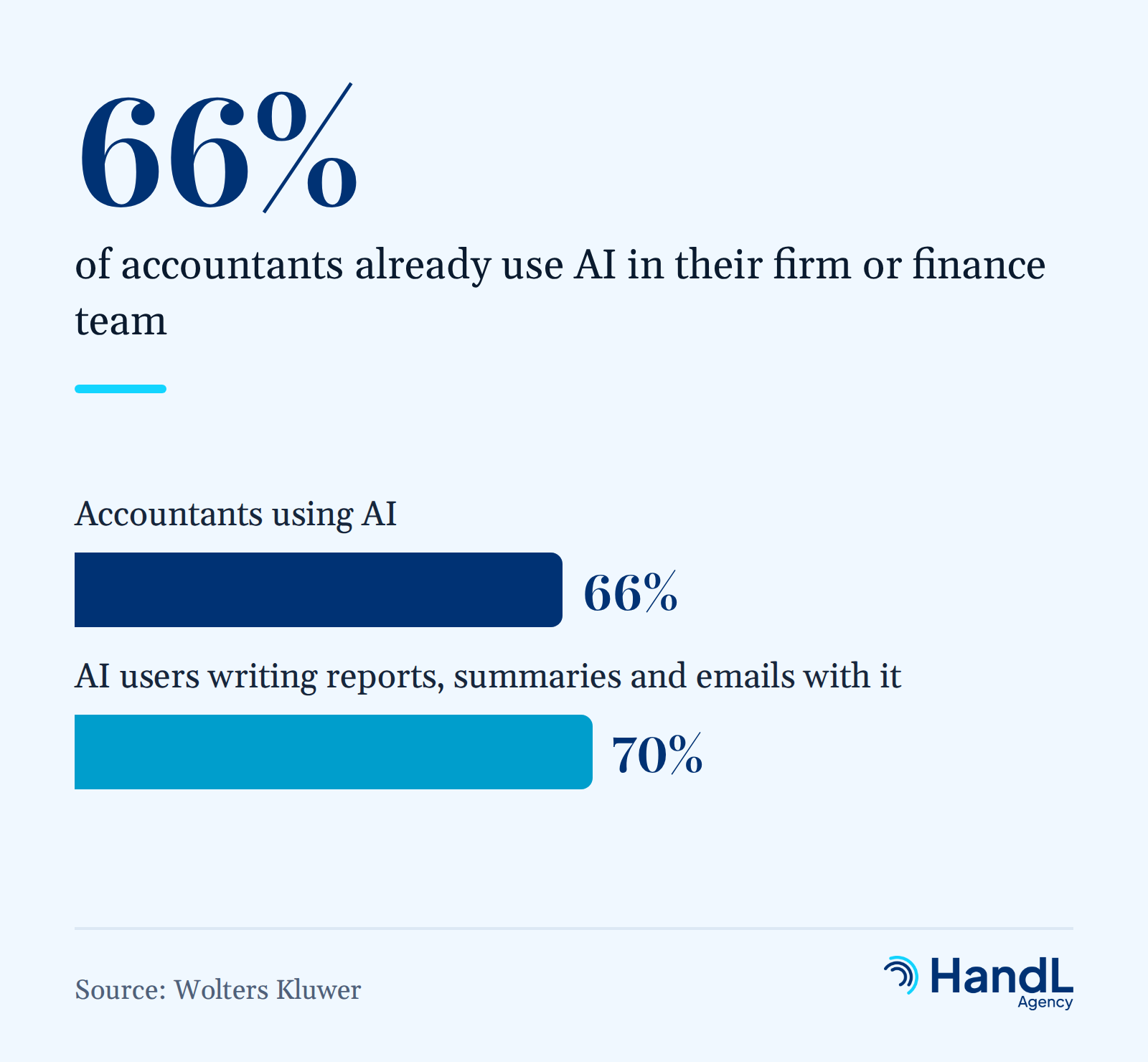
ChatGPT passed 900 million weekly users in February 2026, more than double the figure a year earlier. Accountants are part of that shift. A Wolters Kluwer survey found 66% of accountants already use AI in their firm or finance department, and 70% of those users apply generative AI to drafting reports, summarising financial data and writing client communications.
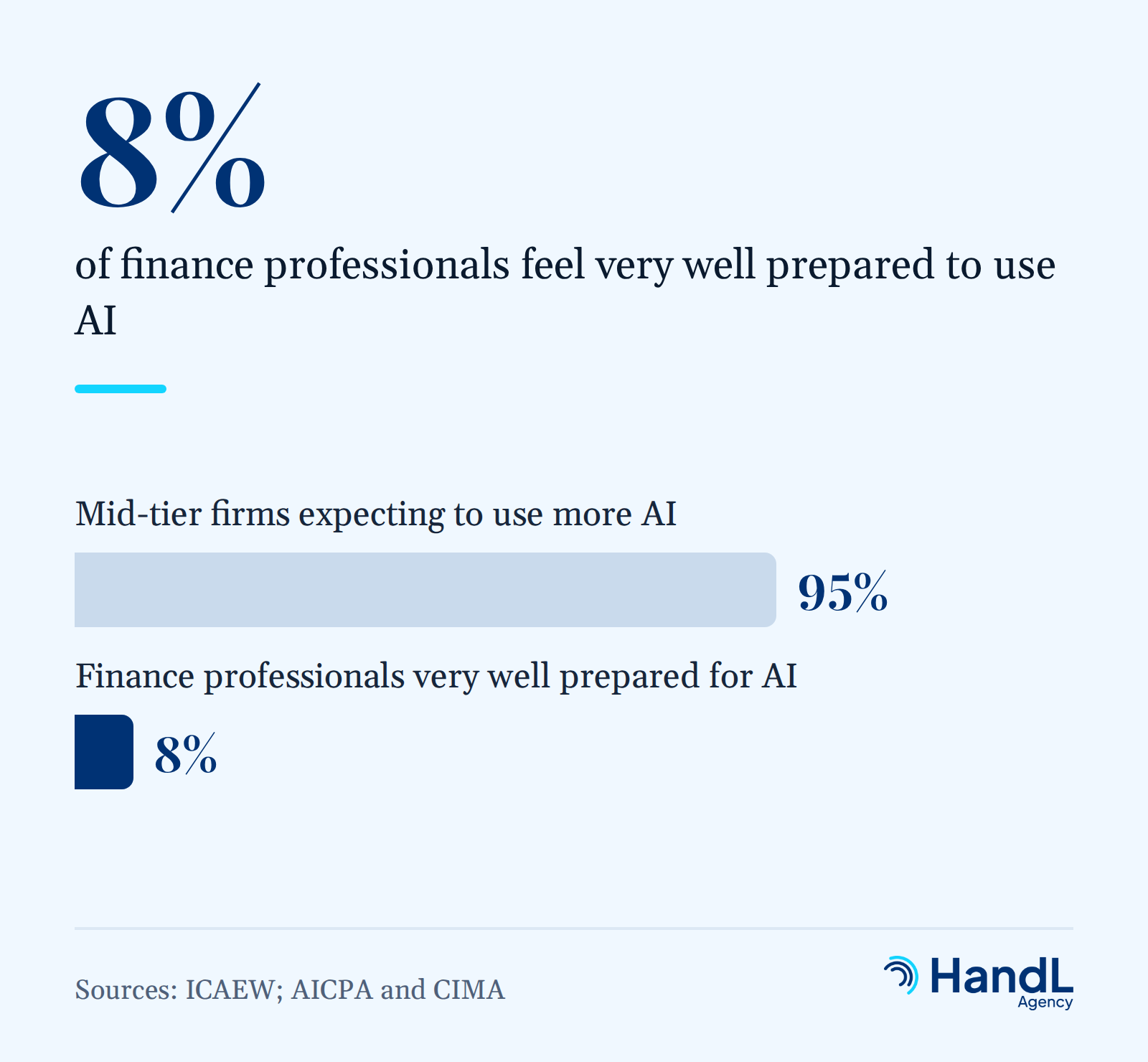
Firms expect that to grow. ICAEW research found 95% of mid-tier accountancy firms expect to use more AI in their operating models over the next three years. Yet preparation lags ambition. In an AICPA and CIMA survey, only 8% of finance professionals said they felt very well prepared to use AI.
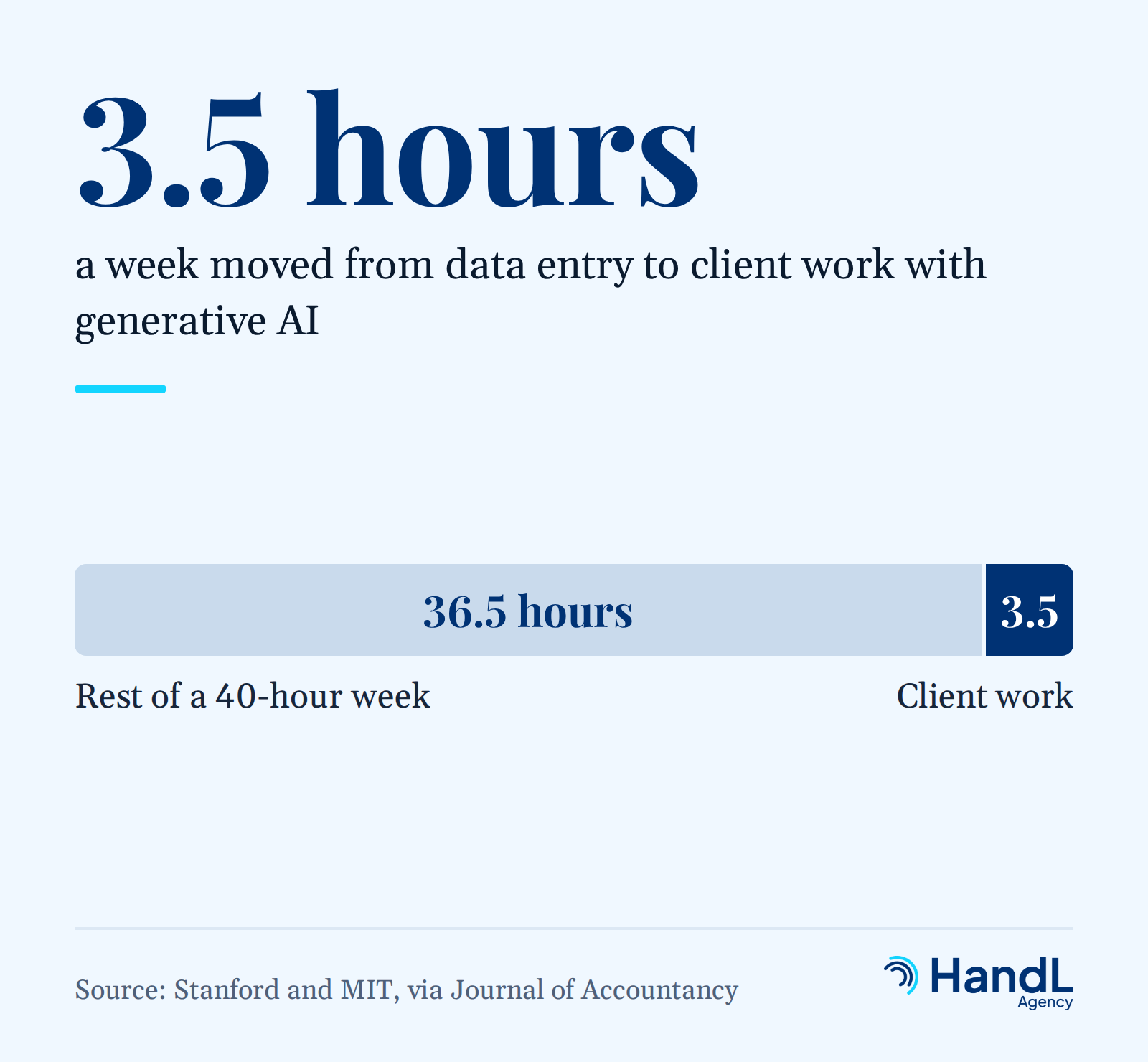
The payoff for getting it right is measurable. A Stanford and MIT study found accountants using generative AI moved 8.5% of their working time away from data entry and towards client communication and quality assurance, roughly 3.5 hours in a 40-hour week.
HandL Agency’s own client work shows the same pattern at task level.
| Task | Before AI | With AI | Firm type |
|---|---|---|---|
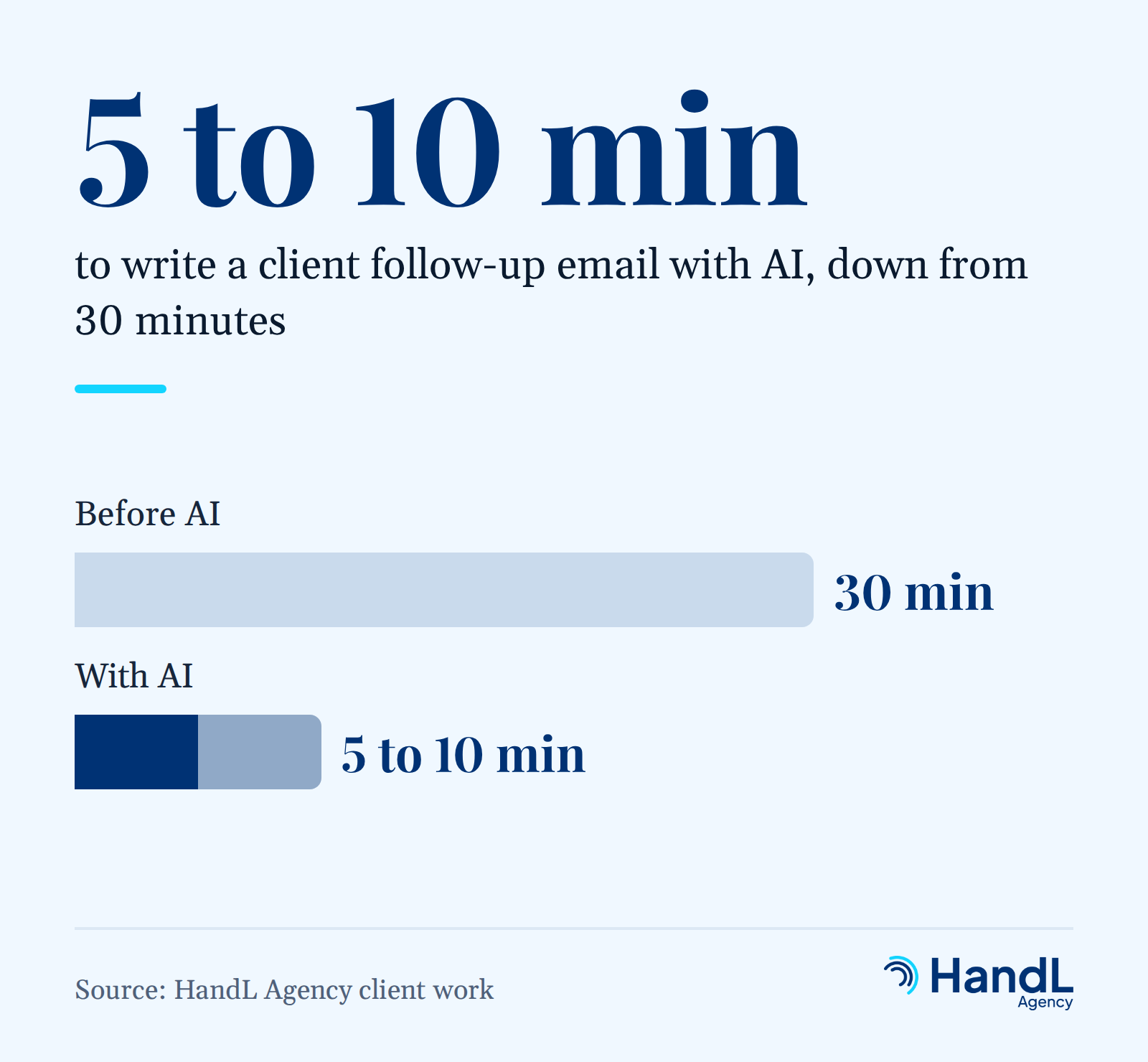
| Client meeting follow-up email | 30 minutes | 5 to 10 minutes | Bookkeeping firm |
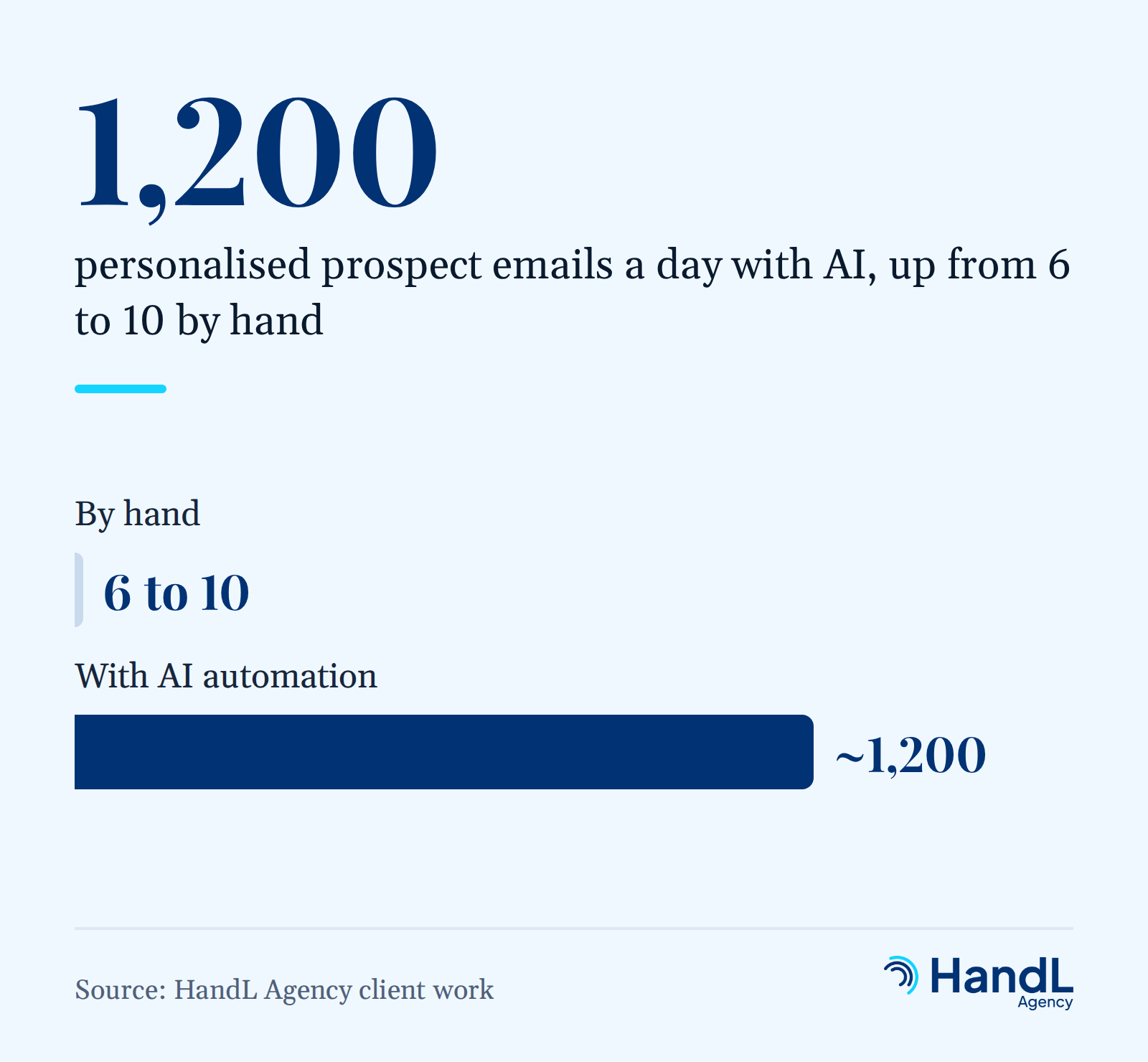
| Prospect research and personalised outreach email | 30 to 60 minutes each, 6 to 10 a day | Researched and written automatically, around 1,200 a day | Finance firm |
| Weekly admin: onboarding, email replies, SOPs and presentation decks | Done manually | 15+ hours saved every week | Bookkeeping firm |
Figures are client-reported and based on HandL Agency’s own records.
At HandL Agency, we’ve called over 1,000 accountants to talk about AI and worked with more than 20 finance firms on AI and marketing. The pattern is consistent.

Most accountants know AI matters. The trouble is they don’t know how to implement it, or they’ve tried it, it didn’t work, and now they think the tech is bad. The tech isn’t the problem. How it’s being used is.
Luke Iles, HandL Agency
The most common mistake is treating ChatGPT like a search engine.
Most firms we speak to use ChatGPT like Google. They ask it questions and stop there. A lot of them think that puts them ahead of the curve, but everyone uses ChatGPT now. Using it doesn’t make you an AI firm.
Luke Iles, HandL Agency
The second is splitting the firm in two.
Partners are either excited about AI or scared of it. Where it goes wrong is when one director is using it in sales and marketing and the rest of the firm isn’t. You need the whole firm in the same camp.
Luke Iles, HandL Agency
Accounting tasks ChatGPT handles well
The best accounting tasks for ChatGPT share three traits. They’re repetitive, they’re heavy on text or data, and a qualified person can check the result quickly. Routine tasks you do every day are where the hours come back.

Automate the boring, repetitive tasks you do every single day, even the ones that only take five or ten minutes. We had a firm that wanted to automate onboarding, but they signed one client a month. It wasn’t worth it. They needed more marketing first.
Luke Iles, HandL Agency
Data entry, bank statements and accounting data
ChatGPT can take a lot of manual data entry off your team:
- Extract transactions from bank statements and lay them out in a table.
- Categorise uncategorised bank transactions into tables with a suggested category for each line.
- Sort and organise accounting data, and clean it by removing duplicates.
- Generate CSV files from multiple data sources, ready to import into your accounting software.
Scrub names, account numbers and anything else that identifies a client before you upload a statement. More on that in the client data section below.
Invoice processing and invoice coding
ChatGPT can assist with coding expenses on invoices by suggesting nominal codes from line descriptions, and with invoice coding questions your team would otherwise escalate. Dedicated invoice platforms now build large language models into their tools to assign general ledger codes based on a business’s past coding decisions.
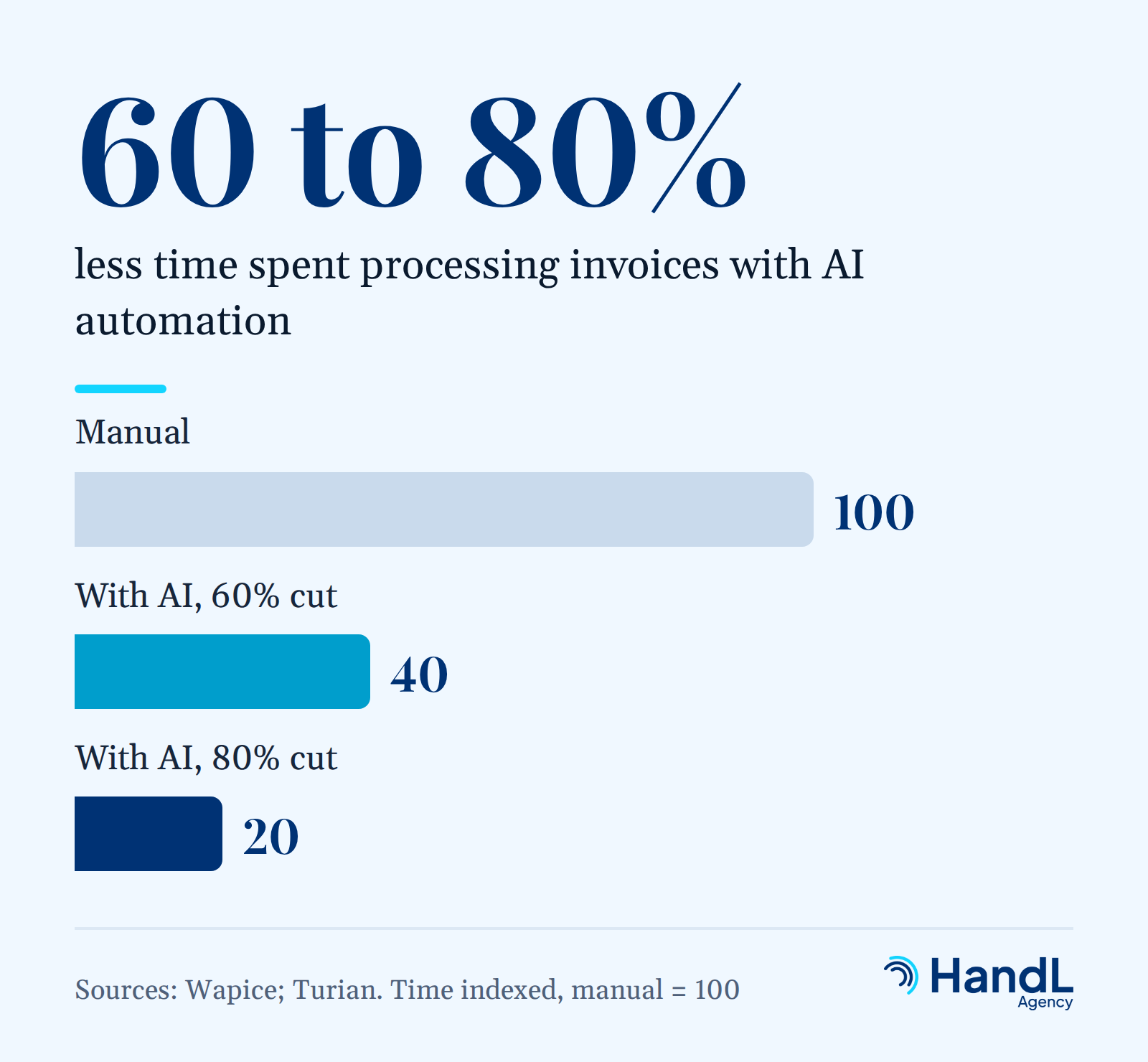
The industry numbers behind automated invoice processing are strong. Businesses using AI invoice automation typically cut processing time by 60% to 80%. For volume work, a chat window isn’t the right home. That’s where a proper automation takes over, which we cover later.
Excel formulas, pivot tables and VBA
Excel is where many accountants get their first real win. ChatGPT can:
- Create new Excel formulas from a plain-English description of what you need.
- Modify complex formulas and explain what each part does.
- Improve existing formulas so they run more efficiently.
- Help you set up advanced pivot tables.
- Debug VBA (macro) scripts that have stopped working.
Check the logic before any formula goes into a live workbook. ChatGPT predicts text rather than doing maths, so a formula can look right and reference the wrong range.
First drafts of reports, board papers and financial reports
ChatGPT is useful for first drafts of reports and board papers. Give it structured financial outputs and it can draft management commentary and executive summaries, add narratives and notes to financial reports, and summarise significant changes in account balances between periods.
It can also explain how journal entries should be structured or draft proposed entries for a reviewer, but posting to the ledger stays with a person. It’s important to maintain human oversight whenever AI outputs feed into financial reporting or financial statements.
Checklists, SOPs and documentation
ChatGPT can help with creating checklists and standard operating procedures for accounting tasks. Describe how your firm does a job, and it turns that into clean documentation your whole team can follow.
Our free SOP generator does exactly this: https://handlagency.gumroad.com/l/sop-prompt-pack

Marketing your accounting practice
ChatGPT can generate marketing strategies for accounting firms. It can create buyer personas and social media strategies, help craft content marketing strategies and blog copy, and assist with newsletter strategies and copy. Using ChatGPT this way can save a lot of time in developing marketing plans.
ChatGPT will give you a reasonable marketing plan in ten minutes. What it can’t give you is a clear niche or proof that you’re good at what you do. Feed it your own client wins and your own numbers, and it gets far more useful.
Luke Iles, HandL Agency
If you post on LinkedIn, our Unlimited LinkedIn Content Ideas automation turns top creators’ best-performing posts into ideas in your voice: https://handlagency.gumroad.com/l/unlimited-linkedin-content-ideas

Data analysis: using ChatGPT on your financial data
Accountants can upload CSV or Excel files straight into ChatGPT. ChatGPT then writes and runs Python in the background to analyse the file, so you get answers, charts and cleaned files without writing code.
For financial analysis, that means ChatGPT can:
- Perform variance analysis and flag unusual expense spikes.
- Analyse financial data for anomalies, such as duplicate payments or out-of-pattern transactions.
- Generate preliminary financial forecasts and budgets as a starting point for review.
- Help detect cash flow issues early by spotting trends in receipts and payments.
Always scrub sensitive client information from datasets before uploading to maintain privacy compliance. Replace client names with codes, remove bank details and strip anything you wouldn’t want outside your firm.
Client communication
Client communication is where most firms feel the difference first. ChatGPT can draft client emails quickly, and summarising long email threads can save significant time before a call.
It can also help explain technical accounting concepts in plain language for clients. A payment on account, a change in a tax code or a VAT scheme can all be turned into a short, clear explanation for someone who isn’t a finance professional. ChatGPT can help brainstorm ideas for business communications too, from fee increase letters to year-end reminders.
For UK firms, Making Tax Digital for Income Tax is a good place to start. It became mandatory from 6 April 2026 for sole traders and landlords with qualifying income above £50,000, and HMRC expects around 780,000 people to sign up in the first phase. ChatGPT can draft the plain-English explainers and quarterly reminders those clients need. Check every date and threshold against HMRC guidance before sending.
Connected to your client data through an automation, AI tools can generate personalised client check-ins automatically and identify clients needing extra attention based on patterns, such as late records or falling margins.
Two rules apply every time. Always proofread ChatGPT outputs before sending them, and keep the writing style consistent with how your firm sounds.
Our free client email prompt pack gives you one prompt that writes emails in your firm’s tone: https://handlagency.gumroad.com/l/client-email-prompt-pack

ChatGPT prompts for accountants
Good results come from good prompts. Prompt engineering sounds technical, but for accountants it comes down to five habits.
- Provide ChatGPT with context. Tell it who you are, what kind of client it’s writing for and what tone to use. Leave out anything that identifies the client.
- Be specific. Use specific prompts to improve ChatGPT’s output accuracy. “Explain payments on account to a first-year sole trader in under 150 words” beats “explain payments on account”.
- Limit the scope. Limit the scope of prompts to reduce inaccuracies. One task per prompt.
- Set the format. Ask for bullet points, a table, a subject line and email, or a word limit.
- Ban invented facts. Tell it not to state rates, thresholds or deadlines from memory, and to mark anything you need to check.
ICAEW also warns that prompts can be used to steer AI towards a pre-decided answer, which is why independent review matters.
Here are five prompts you can copy today. Fill in the brackets and remove client-identifiable details first.
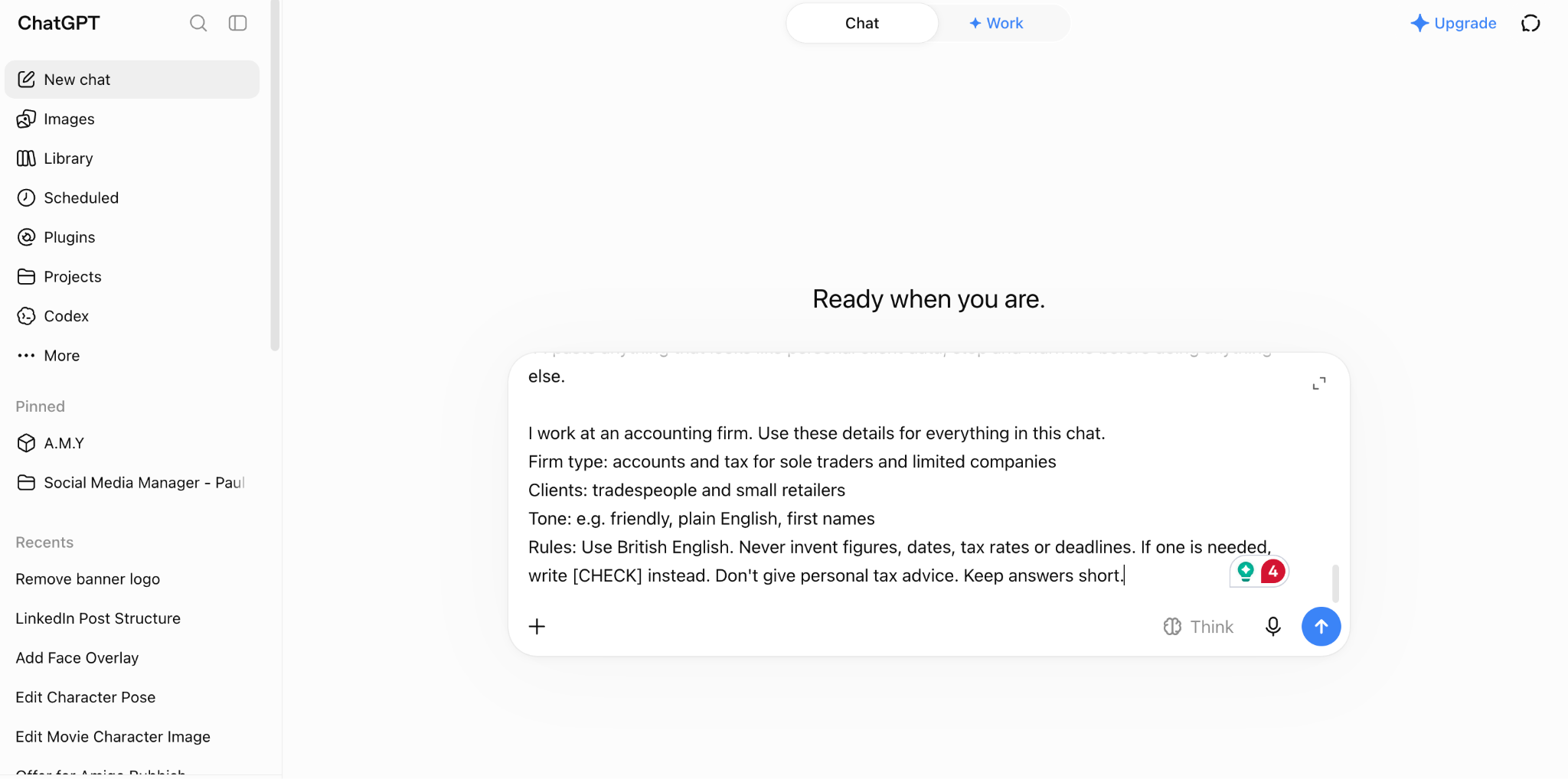
I work at an accounting firm. Use these details for everything in this chat.
Firm type: [e.g. accounts and tax for sole traders and limited companies]
Clients: [e.g. tradespeople and small retailers]
Tone: [e.g. friendly, plain English, first names]
Rules: Use British English. Never invent figures, dates, tax rates or deadlines. If one is needed, write [CHECK] instead. Don't give personal tax advice. Keep answers short.
Reply "Ready" and nothing else.
Explain [the point, e.g. why their payment on account has gone up] to a client who isn't a finance professional.
Client situation: [e.g. sole trader, first year of self-assessment, worried about cash flow. No names.]
Use short sentences and one example with round, made-up numbers.
Don't state current rates or deadlines. Write [CHECK] instead.
Under 200 words. Then list every fact I need to check before sending.
Below is a management accounts summary with this month, last month and budget.
[paste figures with client names removed]
Write a short commentary for the business owner. Cover the three largest variances against budget, flag any unusual expense spikes, and summarise significant changes in account balances.
Use bullet points. Only use the figures provided. If something needs explaining that the figures don't cover, write [CHECK].
Here is a list of bank transactions with no client details.
[paste date, description, amount]
Put them in a table with columns: date, description, amount, suggested category, confidence (high/medium/low).
Use these categories only: [list your chart of accounts categories].
Mark anything you're unsure about as low confidence rather than guessing.
This Excel formula is meant to [what it should do].
Formula: [paste formula]
Columns: [describe what's in each relevant column]
Explain why it isn't working, give me a corrected version, and suggest a more efficient version if there is one.
Want more?
Our free starter pack, Your first 7 AI prompts, covers client emails, explainers, proposals and chasers: https://handlagency.gumroad.com/l/7-first-ai-prompts.
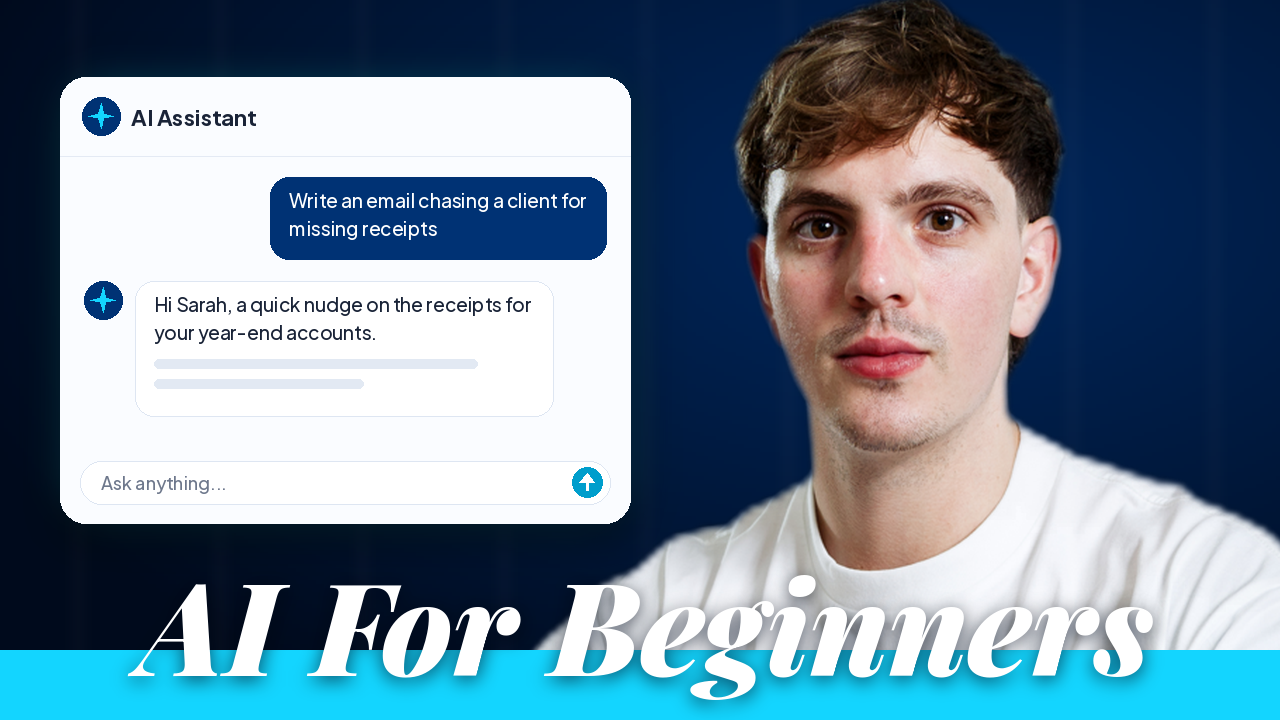
For a bigger set, our 25 AI prompt pack covers documents, proposals, pricing and hiring: https://handlagency.gumroad.com/l/25-ai-prompts-for-finance-firms.

Both were written for Claude, and the prompts work the same way in ChatGPT.
Building ChatGPT into your accounting workflows
Asking ChatGPT one-off questions saves minutes. Integrating AI into your accounting workflows and accounting processes saves hours. That starts with making ChatGPT know your firm.
Set up custom GPTs and projects for your brand, your onboarding and your internal procedures. Share them across the team and everyone writes in the same voice, uses the same format and follows the same process, without you training each person.
Luke Iles, HandL Agency
From there, the step up is automation, where AI does most of the work and a person reviews it. If you’d rather have it built for you, see how we deliver AI for accountants.
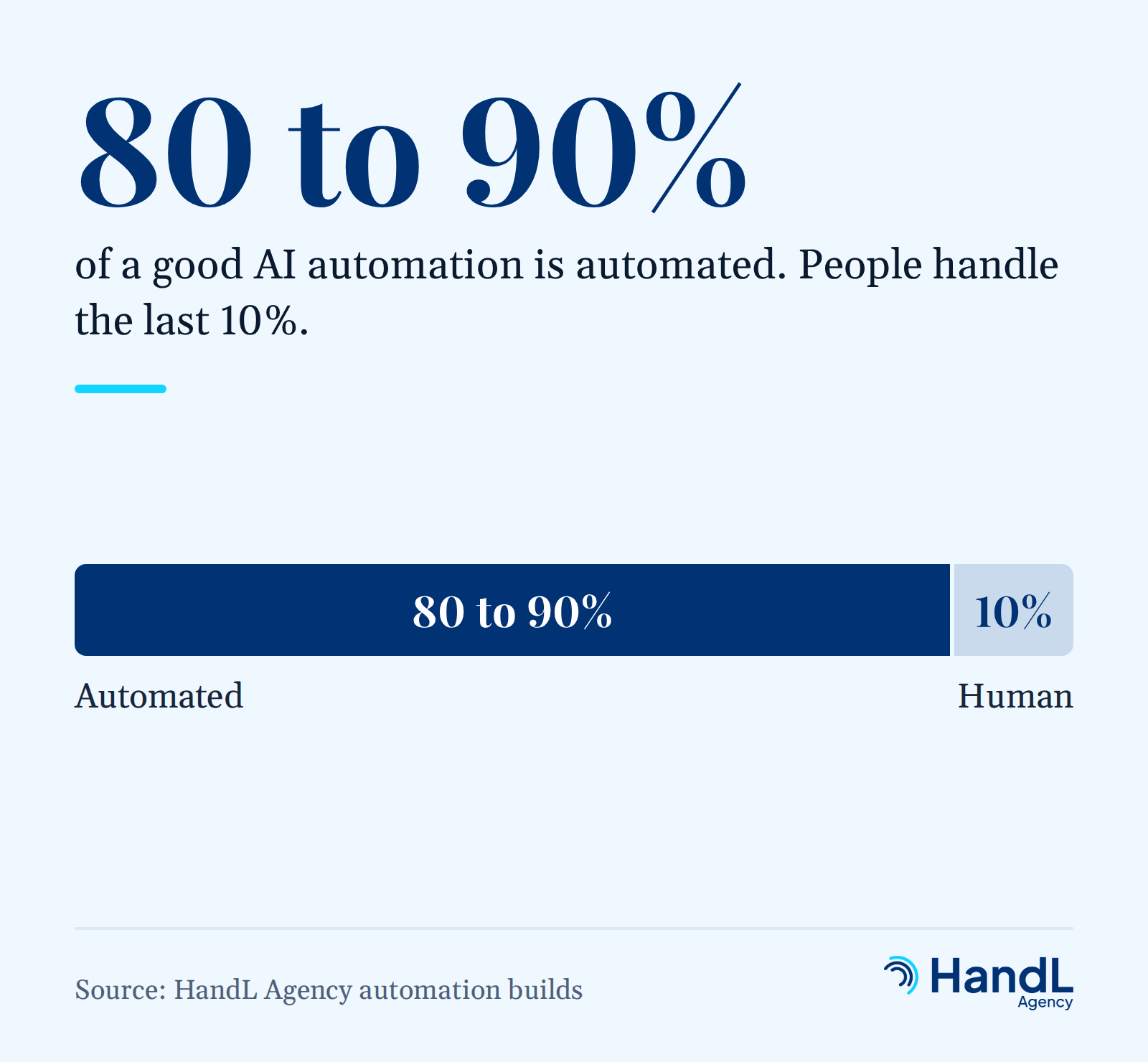
A good AI automation is around 80 to 90% automated and 10% human. You’re not removing people. There’s still manual work and there’s still human connection. Don’t expect a robot to do everything for you. Maybe in 10 or 15 years, but not now.
Luke Iles, HandL Agency
Case study: a bookkeeper who got 15 hours a week back
One bookkeeper we work with was spending 90% of his time on client work. He was too busy to take on more clients, but didn’t have enough of them to justify hiring. Some clients left because he couldn’t keep up with the workload.
He was holding around three client meetings a day and spending half an hour writing each follow-up email. We built AI into his client onboarding, email replies, SOP documents and presentation decks. His follow-ups now take five to ten minutes, and he’s saving over 15 hours every week.
The result wasn’t faster work for the sake of it. He’s delivering better work than before, he’s reinvested in marketing, and he’s now in a position to hire.
AI isn’t about replacing team members. It’s about helping them do the work, so you can focus on the things that build the business: your marketing, your client relationships and the strategic advice AI can’t give.
Luke Iles, HandL Agency
Our free Fathom meeting-notes automation handles the same follow-up problem, filing the notes and drafting the email after every client call: https://handlagency.gumroad.com/l/automate-your-client-meeting-notes

Case study: personalised outreach at scale
A finance firm we work with was researching every prospect by hand before sending an email. Each one took 30 minutes to an hour, which capped them at six to ten emails a day.
We built a system that researches each prospect using Perplexity, pulls details from their LinkedIn, website and recent news, and uses AI to write an email based on the firm’s strategy. It runs as a workflow in n8n. The firm went from a handful of emails a day to around 1,200 personalised emails a day, targeting the top 0.01% of businesses in their market.
Before AI, you chose between bespoke emails at low volume or mass emails that felt generic. With AI, you can have both.
Our Pre-call prospect dossier uses the same research approach to brief you before a sales call: https://handlagency.gumroad.com/l/lead-research-automation
Where ChatGPT fits with your accounting software
ChatGPT doesn’t replace your accounting software. Xero, QuickBooks and FreeAgent hold the ledger. Dext handles receipts. Practice management tools like Karbon run the workflow. ChatGPT sits around them, helping your team read, write, explain and tidy the information that moves between them.
ChatGPT is great for the one-off job: a formula, a summary, a draft. When the same job happens every day, copying and pasting into a chat window becomes the bottleneck. That’s the point to move it into an automation that connects your inbox, your accounting software and the AI directly.
Luke Iles, HandL Agency

On which AI tool to choose, the setup matters more than the brand.
ChatGPT, Claude and Copilot can all write a client email or explain a formula. Pick the one your firm will use, put it on a business plan, and build your prompts and policy around it. If your firm runs on Microsoft 365, Copilot sits where your work already is.
Luke Iles, HandL Agency
Protecting client data and sensitive information
Accountants should never input sensitive client information into public AI models. ICAEW has warned that putting client data of any kind into tools like ChatGPT is a potential breach of confidentiality, because once it’s there you have limited control over how it’s shared, secured and retained.
Your plan matters too. OpenAI doesn’t train on inputs or outputs from ChatGPT Business, Enterprise or the API by default. On Free, Plus and Pro, data sharing is on by default. You can switch it off in Settings, then Data Controls, by turning off “Improve the model for everyone”.
| ChatGPT plan | Trains on your chats by default? | Our view for client work |
|---|---|---|
| Free, Plus, Pro | Yes, unless you switch it off | Only with training off and no client-identifiable data |
| Business, Enterprise | No | Suitable, within your firm’s AI policy |
| API | No | For firms building their own tools |
Don’t input sensitive information into ChatGPT, even with training switched off. That includes:
- Client names, addresses and dates of birth
- UTRs, National Insurance numbers and VAT numbers
- Bank account details and card numbers
- Payroll and salary data
- Anything your engagement letter treats as confidential
Good risk management starts with a written policy. ICAEW recommends firms create clear AI policies, train staff on responsible use, and find out which tools people are already using. Firms in the US will find AICPA guidance takes a similar line, centred on governance, documentation and professional judgement.
What we see most is no plan. Some of the team use ChatGPT, some use other AI tools, some still do everything in Google, and there’s no policy on what’s allowed.
Luke Iles, HandL Agency
At the very least, put an SOP in place for what people can and can’t do in ChatGPT, and train the whole team. It’s like Excel. One person being good at it helps a bit. Everyone being good at it changes how the firm runs.
Luke Iles, HandL Agency
How to cross check ChatGPT outputs
Despite ChatGPT’s capabilities, qualified accountants must verify AI-generated outputs for accuracy. AI outputs should be independently cross-checked, because ChatGPT gets things wrong with total confidence. An answer can be well written and still not accurate.
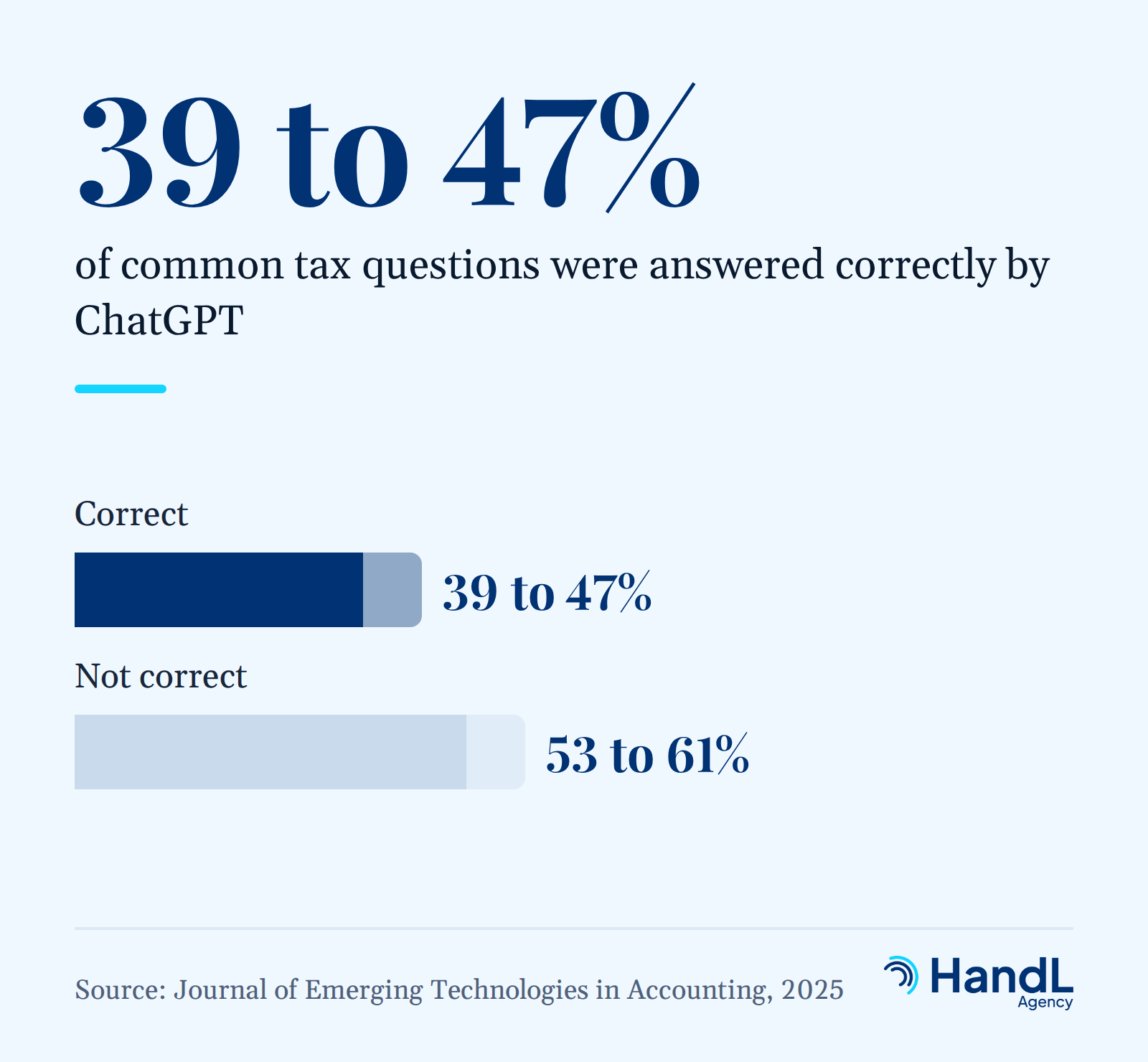
The risk is well documented. A 2025 study in the Journal of Emerging Technologies in Accounting entered common tax questions into ChatGPT during the 2023 and 2024 tax seasons and found only 39% to 47% of its answers were correct. It was less accurate on more complex questions. Newer models perform better, but the lesson holds: check every tax point against the source.
In 2025, Deloitte Australia agreed to partially refund the Australian government for a report that included a fabricated quote from a court judgment and references to academic papers that don’t exist. The revised report disclosed that a generative AI system had been used to write it.
The dangerous answers aren’t the obviously wrong ones. They’re the ones that look right. A tax rate from last year, a threshold that changed, a citation that doesn’t exist. Treat every figure ChatGPT gives you as unverified until you’ve checked it against the source.
Luke Iles, HandL Agency
A simple cross check routine:
- Check every figure against the source document, not against ChatGPT’s summary.
- Check any point of tax law against HMRC guidance or the legislation itself.
- Ask for sources and open them. If a source doesn’t exist, treat the whole answer as suspect.
- Ask the same question again in a new chat. ICAEW guidance notes models rarely repeat the same hallucination, so different answers are a red flag.
- Have someone other than the person who wrote the prompt review anything client-facing.
- Proofread the final version before it’s sent.
Improved accuracy comes from tighter prompts and better checks, not from trusting the tool more.
Keeping an audit trail of AI use
Maintain an audit trail of prompts and responses used in client work. If a regulator, reviewer or client asks how a piece of work was produced, you need to show what AI did and what a person checked.
A basic log records:
- The date, the person and the tool used
- The task and the prompt
- The output, or a link to it
- Who reviewed it and what they changed
This is becoming part of financial controls. In February 2026, COSO published guidance on internal control over generative AI, and auditors are already referencing it when they assess AI-related controls. Good documentation now saves a scramble later.
Decision making: what ChatGPT should never do
ChatGPT should not replace human decision-making in accounting judgements and tax advice. It can draft, summarise and analyse. It can’t weigh a client’s circumstances, apply professional judgement or take responsibility for the outcome.
Tax planning, strategic planning and the business decisions your clients rely on you for stay with qualified people. Use ChatGPT to prepare the ground for strategic decision making, then make the call yourself.
If AI wrote it and your firm sent it, your firm owns it. There’s no version of this where you can blame the tool, so build the review step in from day one.
Luke Iles, HandL Agency
In finance, there’s always going to be a human element. When you’re dealing with people’s money, they want that human connection.
Luke Iles, HandL Agency
The future of ChatGPT in accounting
Digital transformation in accounting operations won’t slow down. Finance teams that build AI into how they work now will set the pace.

AI is the worst it’s ever going to be, and it’s already very good. You’re better off riding the wave than paddling against it. The firms that grew fastest with websites, social media and Google Ads were the ones that started early. AI is the same.
Luke Iles, HandL Agency
In two years, the gap won’t be between firms that use AI and firms that don’t. It’ll be between firms that built it into how they work and firms that still open a chat window when they remember.
Luke Iles, HandL Agency
The technology will keep changing. The solutions that last will be the ones where AI handles the routine tasks and your people focus on clients.
Frequently asked questions

Can accountants use ChatGPT for client work?
Yes, with controls. Use it for drafts, summaries, explanations and data tidying, remove client-identifiable data first, and have a qualified person review every output before it’s used or sent.
Is it safe to put client data into ChatGPT?
Not on a consumer plan with default settings. ICAEW treats client data in public AI tools as a potential confidentiality breach. Use a business plan, scrub data first and follow your firm’s AI policy.
Can ChatGPT do tax calculations or give tax advice?
It can explain how a tax works and check the logic of a calculation you’ve done, but it shouldn’t be relied on for rates, thresholds or advice. It can state outdated tax law confidently, so verify everything against HMRC.
Can ChatGPT read Excel files?
Yes. All plans let you upload Excel and CSV files for analysis, with lower limits on the free plan, and ChatGPT for Excel works directly inside your workbook.
Will ChatGPT replace accountants?
No. It replaces a lot of the repetitive work around accounting. Judgement, advice, accountability and client relationships stay with people.
What’s the best way to learn ChatGPT as an accountant?
Start with one repetitive task, use a proven prompt, log what you do and review the results. Short YouTube videos and our free library are good resources to begin with. Then train your team so everyone works the same way.

Feeling frustrated that you’re not doing more with AI yet?
Even though you know it could save your team hours.
Answer 15 questions to see how well your firm is really using AI and marketing, and what to fix first.
It takes three minutes; you get immediate recommendations plus free assets matched to your results.
About the author

Luke Iles is Director and Head of Digital at HandL Agency, leading the digital marketing team that brings finance firms a pipeline that doesn’t depend on referrals. In 2024, he won Best Local SEO Campaign (Large) at the UK Search Awards. He runs his own SEO and AI search experiments to test new techniques before they reach client work.
Connect on LinkedIn: https://www.linkedin.com/in/luke-iles
Sources
Professional bodies and guidance
- ICAEW, Don’t let AI tools land you in hot water: https://www.icaew.com/regulation/regulatory-news/regulatory-news-2024-02/dont-let-ai-tools-land-you-in-hot-water
- ICAEW, Generative AI and ethics: https://www.icaew.com/technical/technology/artificial-intelligence/generative-ai-guide/ethics
- ICAEW, Generative AI guide: https://www.icaew.com/technical/technology/artificial-intelligence/generative-ai-guide
- The Firm, AI for UK accounting firms: ICAEW, ACCA and GDPR guide: https://www.thefirm.media/articles/ai-uk-accounting-practices-guide/
- The Firm, The one-page AI policy every accounting firm needs (AICPA guidance): https://www.thefirm.media/articles/ai-policy-accounting-firm-one-page-guide/
- Journal of Accountancy, COSO creates audit-ready guidance for governing generative AI: https://www.journalofaccountancy.com/news/2026/feb/coso-creates-audit-ready-guidance-for-governing-generative-ai/
OpenAI and ChatGPT product information
- OpenAI, Introducing ChatGPT for Excel and new financial data integrations: https://openai.com/index/chatgpt-for-excel/
- OpenAI Help Center, What if I want to keep my history on but disable model training: https://help.openai.com/en/articles/8983130-what-if-i-want-to-keep-my-history-on-but-disable-model-training
- OpenAI Help Center, How your data is used to improve model performance: https://help.openai.com/en/articles/5722486-how-your-data-is-used-to-improve-model-performance
- AI Toolbox, ChatGPT for Excel and data analysis guide: https://www.ai-toolbox.co/chatgpt-management-and-productivity/chatgpt-excel-data-analysis-guide-2026
- Coursiv, ChatGPT for Excel and Google Sheets in 2026: https://coursiv.io/blog/chatgpt-for-excel
Research on ChatGPT accuracy
- Antinozzi and Cooper, Is ChatGPT an accurate source of information for uninformed taxpayers?, Journal of Emerging Technologies in Accounting (2025): https://publications.aaahq.org/jeta/article-abstract/22/1/23/13402/Is-ChatGPT-an-Accurate-Source-of-Information-for
- AP via Yahoo News, Deloitte to partially refund Australian government for report with apparent AI-generated errors: https://www.yahoo.com/news/articles/deloitte-partially-refund-australian-government-070855665.html
Usage and adoption statistics
- TechCrunch, ChatGPT reaches 900M weekly active users: https://techcrunch.com/2026/02/27/chatgpt-reaches-900m-weekly-active-users
- Wolters Kluwer, How are accountants in the UK using artificial intelligence: https://www.wolterskluwer.com/en-gb/expert-insights/how-is-ai-being-used-by-accountants-in-the-uk
- HeyBRB, UK AI statistics for 2026 (ICAEW mid-tier firm research): https://heybrb.ai/research/uk-ai-statistics
- CurateSuite, AI in accounting: 80 statistics for 2026 (AICPA and CIMA Future-Ready Finance Survey): https://curatesuite.com/accounting/articles/ai-accounting-statistics-2026
- ReceiptsAI, AI accounting and automation statistics (Stanford and MIT study, via Journal of Accountancy): https://receiptsai.com/ai-automation-accounting-statistics-2026
Invoice processing
- Wapice, Can AI implementation improve invoice processing accuracy: https://wapice.com/insights/can-ai-implementation-improve-invoice-processing-accuracy/
- Turian, AI invoice processing: https://www.turian.ai/blog/ai-invoice-processing
Making Tax Digital
- IRIS, Making Tax Digital for accountants: a practice-wide strategy for 2026/27: https://www.iris.co.uk/blog/accountancy/making-tax-digital-for-accountants-practice-strategy/
- Techfinitive, How UK accountants are preparing for Making Tax Digital for Income Tax: https://www.techfinitive.com/features/end-of-tax-year-2026-how-uk-accountants-are-preparing-for-making-tax-digital-for-income-tax/
Methodology
This guide combines first-hand experience from HandL Agency’s work with finance firms and published research on ChatGPT and AI in accounting.
Interview. The practical insights and quotes come from a recorded interview with Luke Iles in September 2026, covering how accounting firms use ChatGPT, where they go wrong and what HandL Agency builds for them.
Experience base. HandL Agency has worked with more than 20 finance firms on AI and marketing, including accountants, bookkeepers, financial advisers and insurance brokers, and has called over 1,000 accountants to discuss AI adoption.
Case studies and task data. Both case studies and the time-saved table come from real HandL Agency clients, anonymised to protect client confidentiality. Time savings and volumes are based on client-reported figures and HandL Agency’s own records. They have not been independently audited.
Statistics. Figures were taken from primary sources where available, including ICAEW, OpenAI, Wolters Kluwer and peer-reviewed research. Where a primary source wasn’t publicly accessible, we used reputable secondary reporting and named the original source. Adoption figures vary between surveys because each defines “using AI” differently. All statistics were checked in September 2026.
Product information. ChatGPT plan names, data settings and features were checked against OpenAI’s official documentation in September 2026. OpenAI updates its products often, so check current settings before relying on them.
Prompts. The example prompts are adapted from HandL Agency’s free prompt library for finance firms.
Use of AI. This article was researched and drafted with AI assistance, then reviewed and edited by Luke Iles and Bailey Wilshire.
Updates. We review this guide quarterly and update it when products, guidance or data change.
This guide is general information to help accounting firms use AI tools. It isn’t legal, tax, regulatory, data protection or financial advice. Product features and plan names were correct in September 2026 and may change.